
🕰️ See a person's whole employment story on their Timeline
Every person's profile now has a Timeline tab. It brings their job changes, agreements and letters together in one place, so you don't have to piece the story together from different pages.
Upcoming changes show first. Past changes sit below, grouped by day and month.
What this means for you
- Changes to job title, manager, department, pay and employment type all appear in one list.
- Agreements and letters show with their status and a link, so you can open the document straight away.
- You can see what's coming up as well as what has already happened.
- Owners, admins and managers can see the Timeline once it's switched on.
What you need to do
Nothing to set up. If you're an owner, look for the banner on the People page. It offers a short tour of where to find the Timeline. Choose "Show me" to take the tour or "Maybe later" to skip it.
Want to know more? Read Employee Timeline: the story of your people at a glance.
⚡ Smart Agreements: a 4-hour turnaround on agreements we prepare
If you have Smart Agreements, agreements our team prepares for you are now ready within 4 hours. Without Smart Agreements, the turnaround stays at 2 business days.
What this means for you
- Complex agreements and contractor agreements come back within 4 hours.
- The same applies when a manager without the Smart Agreements permission requests an agreement.
- Straightforward agreements you create yourself still go straight back to you.
- When you send us a request, MyHR now tells you when to expect it.
What you need to do
Nothing. It's already in place for accounts with Smart Agreements.
✅ Change your onboarding plan with ease
There's now a "Choose a different plan" link under the plan name on the Finalise & share page. It opens the same plan editor as the pen icon, but it's much easier to spot.
What this means for you
- The option to switch to a different plan is easier to find.
- The onboarding plan card now stays open instead of collapsing.
- A tick in the card header shows the plan's status: grey means it isn't published yet, green means it is.
What you need to do
Nothing. Look for the link next time you finalise a plan.
🍁 Fill in your TD1 without leaving MyHR (Canada)
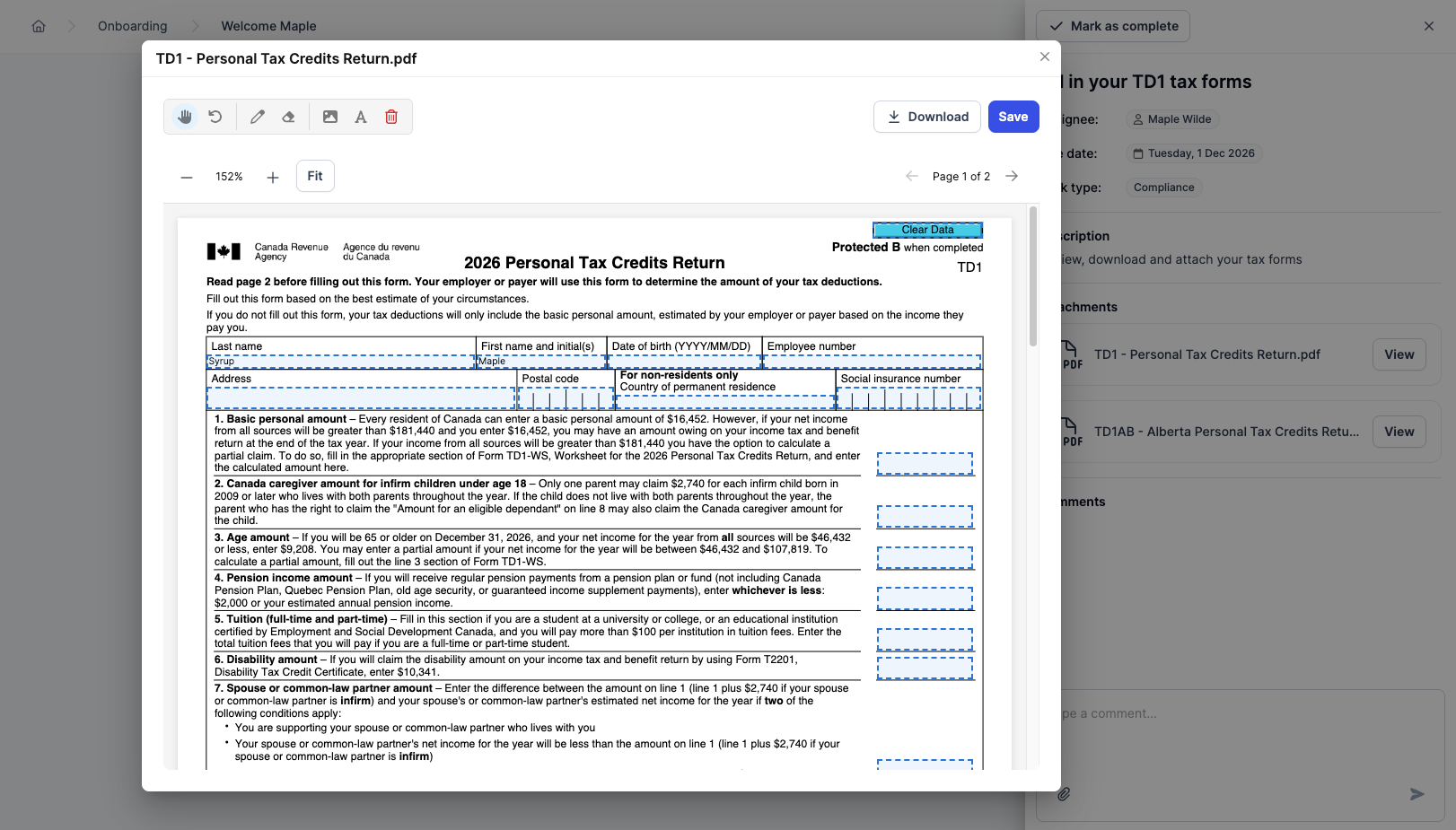
Canadian employees can now complete their TD1 Personal Tax Credits Return in MyHR. No more downloading the form, filling it in somewhere else and uploading it again.
 What this means for you
- New hires complete their TD1 right on their onboarding task.
- It covers the 2026 federal form and all 12 provincial and territorial versions.
- Quebec isn't included, because it uses a different form.
What you need to do
Nothing. Your Canadian employees will see the fillable form on their TD1 onboarding task.
🔧 Fixes and improvements
- Editing an onboarding plan no longer shows the same role more than once.
- Leave requests now show every public holiday that falls on the same day. For example, 1 February 2027 in NZ shows both Nelson Anniversary and Auckland Anniversary.
- Canadian federal holidays now show accurately.
-
The Ask Us button now stays out of the way of other controls on smaller screens.
-
NZ onboarding plans have been updated to use the August 2026 version of the IR330 tax code declaration form from Inland Revenue. New plans get the updated form. Existing plans keep their original form.